Overview

Looking for a simple way to improve your organizations security using Entra Conditional Access policies? Implement a policy to block Device Code Flow! Device Code Flow is an OAuth 2.0 authentication method often used by devices with limited input capabilities, such as smart TVs or IoT devices. While convenient, it can introduce security risks if not properly controlled.

As of recent updates, Conditional Access now supports Authentication Flow conditions, allowing administrators to enforce policies specifically for Device Code Flow.

Why Block Device Code Flow?

While convenient for users, Device Code Flow does not support modern security controls like MFA in the same way as interactive flows. Attackers can exploit this flow to gain unauthorized access if credentials are compromised. Blocking it ensures that only secure authentication methods are allowed.

What are the risks of Blocking Device Code Flow?

If your organization uses Teams rooms or Teams phone handset devices and device code flow is/was leveraged to authenticate users, blocking device code flow will prevent these devices from working moving forward unless these devices are excluded from the block policy. Otherwise, there is very little risk impact for most organizations.
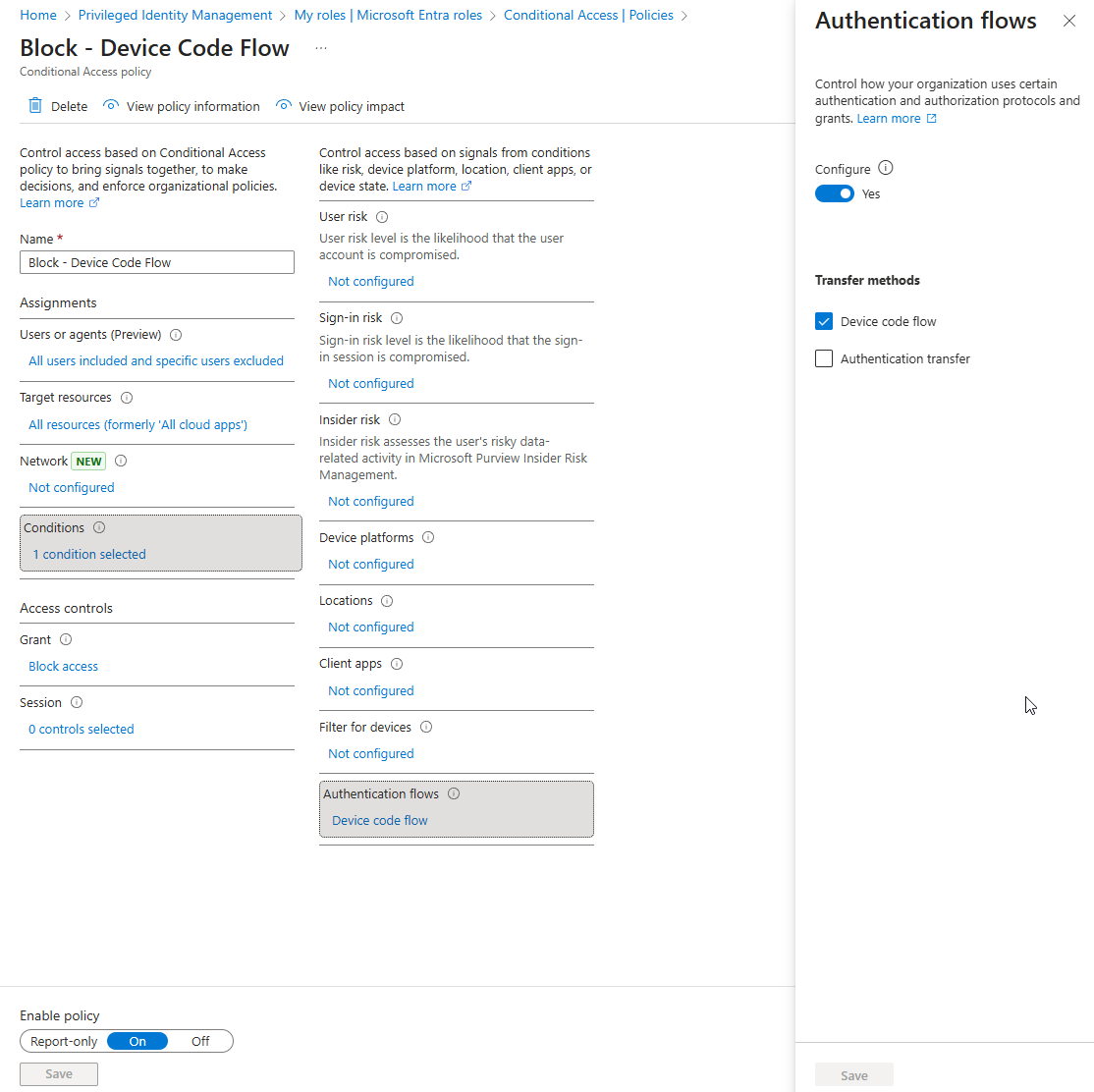
Policy Deployment Step-by-Step

  1. Sign in Entra Admin Center
  2. Navigate to Security > Conditional Access > Policies
  3. Click New Policy and give it a name, such as "Block - Device Code Flow"
  4. Configure Assignments
    1. Users: Include All Users, exclude any Break Glass Accounts. (Set these up if you don’t already have them:  https://learn.microsoft.com/en-us/entra/identity/role-based-access-control/security-emergency-access )
    2. Cloud Apps or Actions: Include All Resources.
  5. Set Conditions: Under Authentication Flows, select Device Code Flow and configure to Block.
  6. Access Controls: Under Grant, choose Block Access.
  7. Review and enable the policy
Example Device Code Flow Block Policy in Entra ID

Conditional Access Policy Best Practices

  • Always exclude emergency access/break glass accounts to avoid lockouts.
  • Test the policy in report-only mode before enforcing.
  • Regularly review Conditional Access policies for alignment with organizational security requirements.
  • Document your conditional access policies for version control and configuration drift management.

Conclusion & Call to Action

Blocking Device Code Flow is a simple yet effective way to reduce attack surface and enforce secure authentication practices. Conditional Access is one of the most powerful security controls in Microsoft Entra but implementing it incorrectly can lead to gaps in protection or even lockouts for critical accounts. That’s where Lightspire comes in.

With a foundation rooted in Microsoft expertise and a passion for secure, scalable IT solutions, Lightspire can help you confidently deploy Conditional Access across your organization:

  • Microsoft-Certified Expertise — tailored Conditional Access strategies based on deep technical knowledge.
  • Clear, Collaborative Engagement — We guide clients with transparency and ongoing education, ensuring your team understands not just how Conditional Access works, but why it's configured that way.
  • Customized, Practical Solutions — Whether you're a small business or midsize enterprise, Lightspire designs adaptive policies aligned with your compliance requirements, risk profile, and business goals.
  • Long-Term Partnership — More than a one-time project, we commit to evolving your environment—ensuring your Conditional Access framework grows with changes in Microsoft Entra and your security needs.

Contact us and schedule a consultation today!

Let’s Clarify Your IT Strategy

Unlock the full power of Microsoft to elevate your business. Let’s build smarter, faster, and more secure solutions—together.